# Announcement bar
The **Announcement Bar** is a feature in Shopify that allows you to display important messages or promotions at the top of your store. This is a great way to catch your customers' attention with updates, offers, or news.
Announcement bar
{% hint style="success" %}
1. Go to **Shopify Admin > Online Store > Themes.**
2. In **Customize** on your active theme.
3. **Click Announcement Bar.**
{% endhint %}
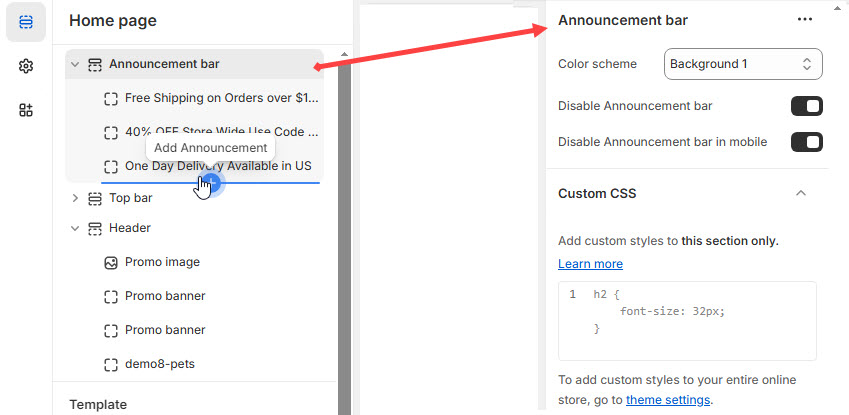
**Color scheme :** You can customize the section’s appearance by changing the **text color, background color**, and more using preset color options to the announcement bar.
**Enable or Disable Announcement Bar** : Allows users to show or hide the announcement bar across the entire site.
**Enable or Disable Announcement Bar on Mobile**: Hides the announcement bar only on mobile devices while keeping it visible on desktop.
{% hint style="info" %}
**Adding Block :** Announcement Bar > **Click Add Announcement.** Without adding block to Announcement bar it will not be visible
{% endhint %}
**Announcement Block:** Add the respective Text and Link to the Announcement Block and click **save**.